
Someone can use a laptop every day and still feel unsure whether a basic computer test would actually go well – daily habits cover email and a browser, but rarely touch the settings or shortcuts that only come up once in a while. That uncertainty is normal going into any computer assessment, and it usually says more about which specific tasks haven't come up recently than about overall competence.
The test covers four practical areas, each reflecting something people actually run into during a normal week rather than obscure technical trivia.
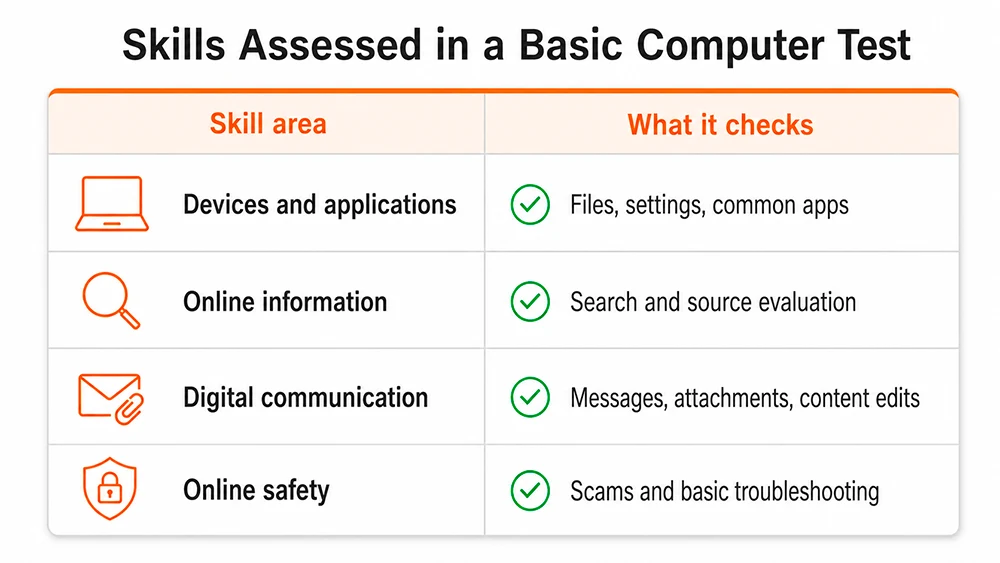
This part checks comfort with the basics that show up across almost every job and daily task – navigating an operating system, opening and saving files correctly, and using common applications like a word processor or spreadsheet without hunting for every button. A typical question might describe connecting a laptop to a larger screen for a presentation and ask which cable or connection type actually does the job.
Search skills here go beyond typing a query – the section checks whether someone can judge which result actually deserves trust. A question might present an article making a surprising claim with no listed author or date, then ask what the most sensible next step is before sharing it further.
This covers sending information clearly and creating basic digital content – attaching the right file, formatting a message so it reads well, or making small edits to an image or document. One scenario might involve needing to send several large photos when an email attachment limit gets in the way, asking which solution actually works.
Recognizing a scam attempt and knowing the first move when something breaks both live here. A question might describe a text message claiming to be from a bank, asking for a password through a link – testing whether the safer response comes naturally.
Knowing what the test actually looks like beforehand removes most of the guesswork – here's the structure and a few examples of what comes up.
The test runs 25 questions, each with several possible answers and one correct choice. It can be paused partway through and picked back up later, which takes the pressure off finishing everything in one uninterrupted sitting – useful groundwork for anyone filling out a computer skills assessment questionnaire for the first time.
A few situations show up in a form close to what the actual test presents:
recovering a file deleted five minutes earlier, without installing any special software;
deciding what to do with a text message asking to confirm a bank password through a link;
choosing the best way to send several large photos when an email attachment limit gets in the way.
None of these require memorizing facts in advance – they're built to check whether a sensible response comes naturally when a familiar situation shows up unexpectedly.
Preparation here works best when it targets specific gaps rather than covering everything from scratch – three areas make the most difference.
The tasks worth revisiting are usually the ones done rarely enough to feel unfamiliar – renaming a file cleanly, setting up shared access to a folder, or attaching the correct version of a document rather than an outdated draft. A quick walk-through of a basic computer skills assessment style task list surfaces these gaps faster than general review ever does.
Opening the privacy settings on one commonly used account and actually reading what each toggle controls reveals more than reading a general safety guide would. Most people have never checked what "who can see this" actually means on a specific platform, even though they've clicked past that screen dozens of times.
Taking a real basic computer skills test beforehand shows the format directly rather than leaving it to guesswork – 25 questions, the option to pause, and a result broken down by category once it's finished. Seeing the structure once tends to remove more anxiety than any amount of general preparation.
A result split across categories reveals more than one overall number ever could – someone might score comfortably on communication and content creation while landing lower specifically on security, which points to one concrete area worth a short review rather than a vague sense of "needing to improve." A computer skills practice test works best read this way – as a map pointing to specific gaps worth a closer look.
A low score in one category – security, say – usually points to one specific area worth a short, targeted look before it becomes relevant in a real situation, rather than reflecting overall computer skill. Treating the result as a starting point for exactly what to review next gets more value out of the test than treating it as a final grade.
No installs needed. It's all browser-based – open it, take it, done.
It can. The test doesn't lock onto one device type. A phone screen just makes a few questions slightly more fiddly to read than a laptop would.
There's a clock, though pausing mid-test is allowed, so nobody's stuck racing straight through without a break. That break option ends up mattering more to most people than the minute count itself.
Yes. Retaking costs nothing, and the certificate fee only comes up once a result actually looks worth keeping. Nobody's stuck with a single bad attempt.
Depends on the role. For jobs where basic digital literacy matters but isn't the main point, it's a small plus on a resume – actual hands-on experience still outweighs it, but a certificate can tip things in a candidate's favor over an otherwise identical application.